A Mismatched Interaction: Embedding Inclusive Design Into Letterboxd's Search Results Page
A Mismatched Interaction:
Embedding Inclusive Design Into Letterboxd's Search Results Page
A Mismatched Interaction: Embedding Inclusive Design Into Letterboxd's Search Results Page
Timeline:
15 weeks (Sep-Dec 2024)
Skills:
Product Design; UX/UI Design; User Research; Usability Testing; Wireframes, Mockups, & Prototypes
Tools:
Figma, ProtoPie
ProtoPie prototype:
Accessible through this link
Timeline:
15 weeks (Sep-Dec 2024)
Skills:
Product Design; UX/UI Design; User Research; Usability Testing; Wireframes, Mockups, & Prototypes
Tools:
Figma, ProtoPie
ProtoPie prototype:
Accessible through this link
Timeline:
15 weeks (Sep-Dec 2024)
Skills:
Product Design; UX/UI Design; User Research; Usability Testing; Wireframes, Mockups, & Prototypes
Tools:
Figma, ProtoPie
ProtoPie prototype:
Accessible through this link
Overview
Overview
Overview
Problem:
Problem:
Problem:
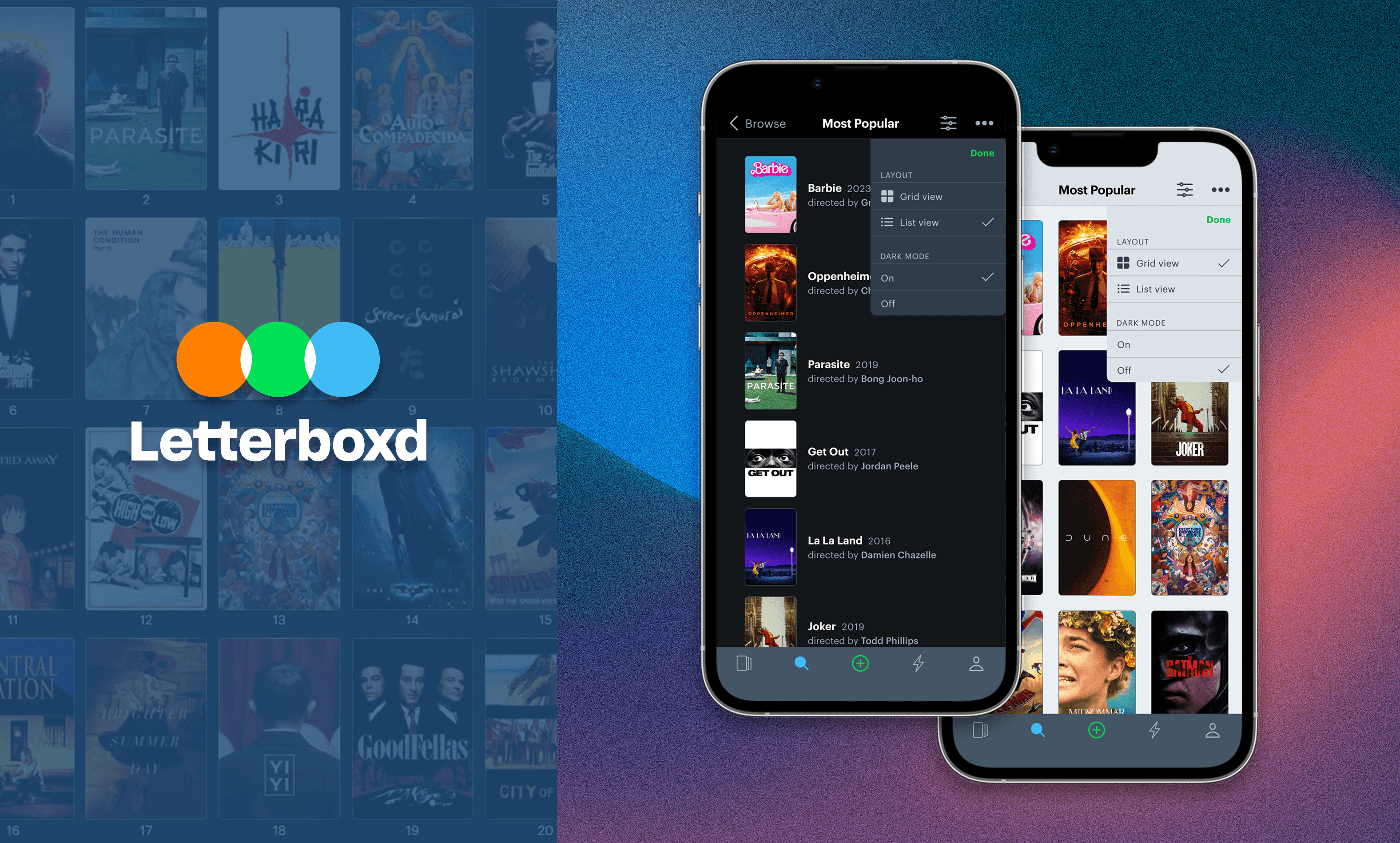
Letterboxd’s Search Results page, a key part of how users discover and save films, presented accessibility challenges for users with visual conditions and impairments, leading to visual clutter and difficulty in navigating content. The original interface lacked options to customize how content is displayed or to reduce cognitive load for diverse visual needs.
Letterboxd’s Search Results page, a key part of how users discover and save films, presented accessibility challenges for users with visual conditions and impairments, leading to visual clutter and difficulty in navigating content. The original interface lacked options to customize how content is displayed or to reduce cognitive load for diverse visual needs.
Letterboxd’s Search Results page, a key part of how users discover and save films, presented accessibility challenges for users with visual conditions and impairments, leading to visual clutter and difficulty in navigating content. The original interface lacked options to customize how content is displayed or to reduce cognitive load for diverse visual needs.
Approach:
Approach:
Approach:
Accessibility-focused user research was conducted to understand specific visual constraints and how they impacted real interactions. Proposed changes include adjustable layouts and display modes, testing them with participants as part of the refinement process.
Accessibility-focused user research was conducted to understand specific visual constraints and how they impacted real interactions. Proposed changes include adjustable layouts and display modes, testing them with participants as part of the refinement process.
Accessibility-focused user research was conducted to understand specific visual constraints and how they impacted real interactions. Proposed changes include adjustable layouts and display modes, testing them with participants as part of the refinement process.
Solution:
Solution:
Solution:
The redesign simplified the Search Results view by increasing spacing, adding togglable grid/list views, and offering dark/light mode to improve readability and reduce visual strain. Usability testing showed that these changes improved task performance and gave users greater control and comfort, enhancing inclusivity without sacrificing core functionality.
The redesign simplified the Search Results view by increasing spacing, adding togglable grid/list views, and offering dark/light mode to improve readability and reduce visual strain. Usability testing showed that these changes improved task performance and gave users greater control and comfort, enhancing inclusivity without sacrificing core functionality.
The redesign simplified the Search Results view by increasing spacing, adding togglable grid/list views, and offering dark/light mode to improve readability and reduce visual strain. Usability testing showed that these changes improved task performance and gave users greater control and comfort, enhancing inclusivity without sacrificing core functionality.
Research Triangulation
Research Triangulation
Research Triangulation
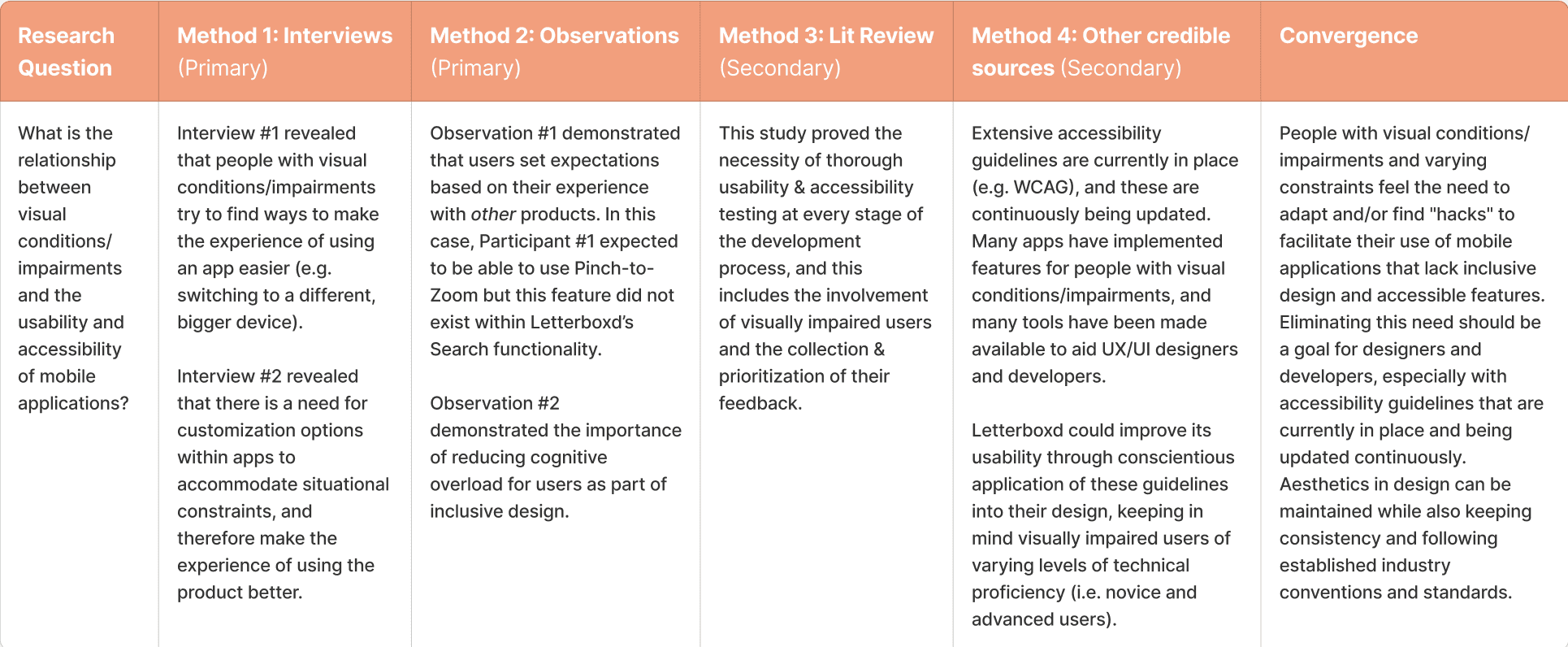
The following summary is based on a mixture of semi-structured interviews conducted with anonymous participants; participant observations using the AEIOU Framework; literature review; and articles from credible non-academic sources.
The following summary is based on a mixture of semi-structured interviews conducted with anonymous participants; participant observations using the AEIOU Framework; literature review; and articles from credible non-academic sources.
The following summary is based on a mixture of semi-structured interviews conducted with anonymous participants; participant observations using the AEIOU Framework; literature review; and articles from credible non-academic sources.
Persona Spectrum
Persona Spectrum
Persona Spectrum
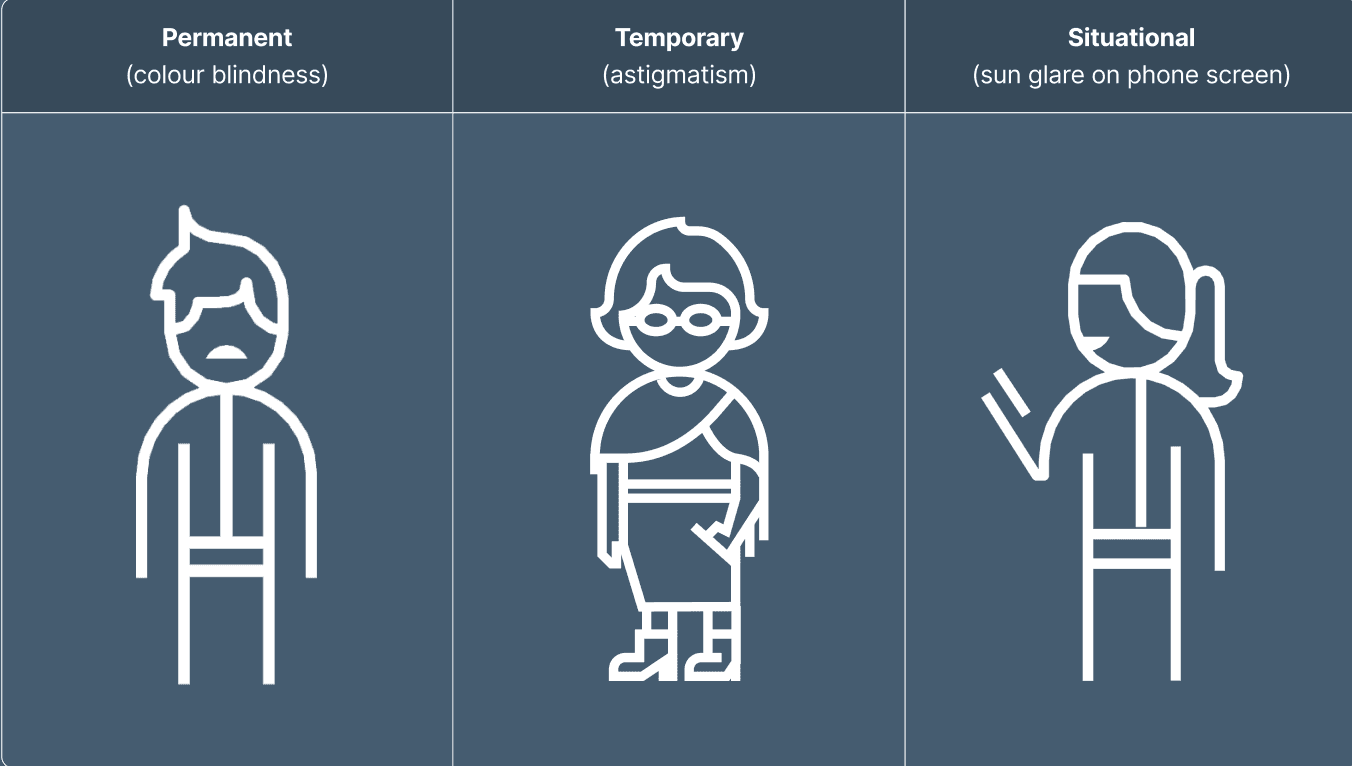
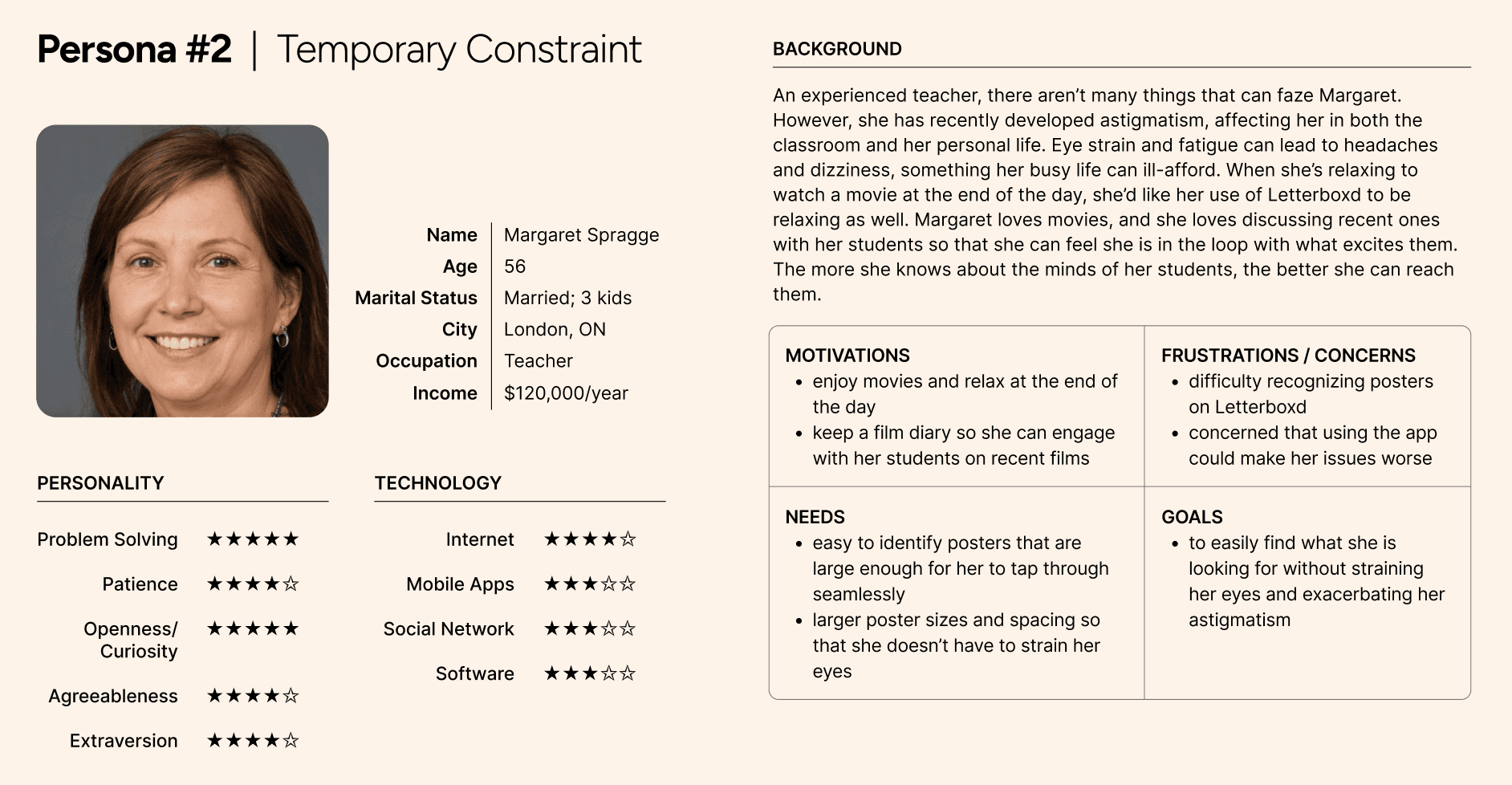
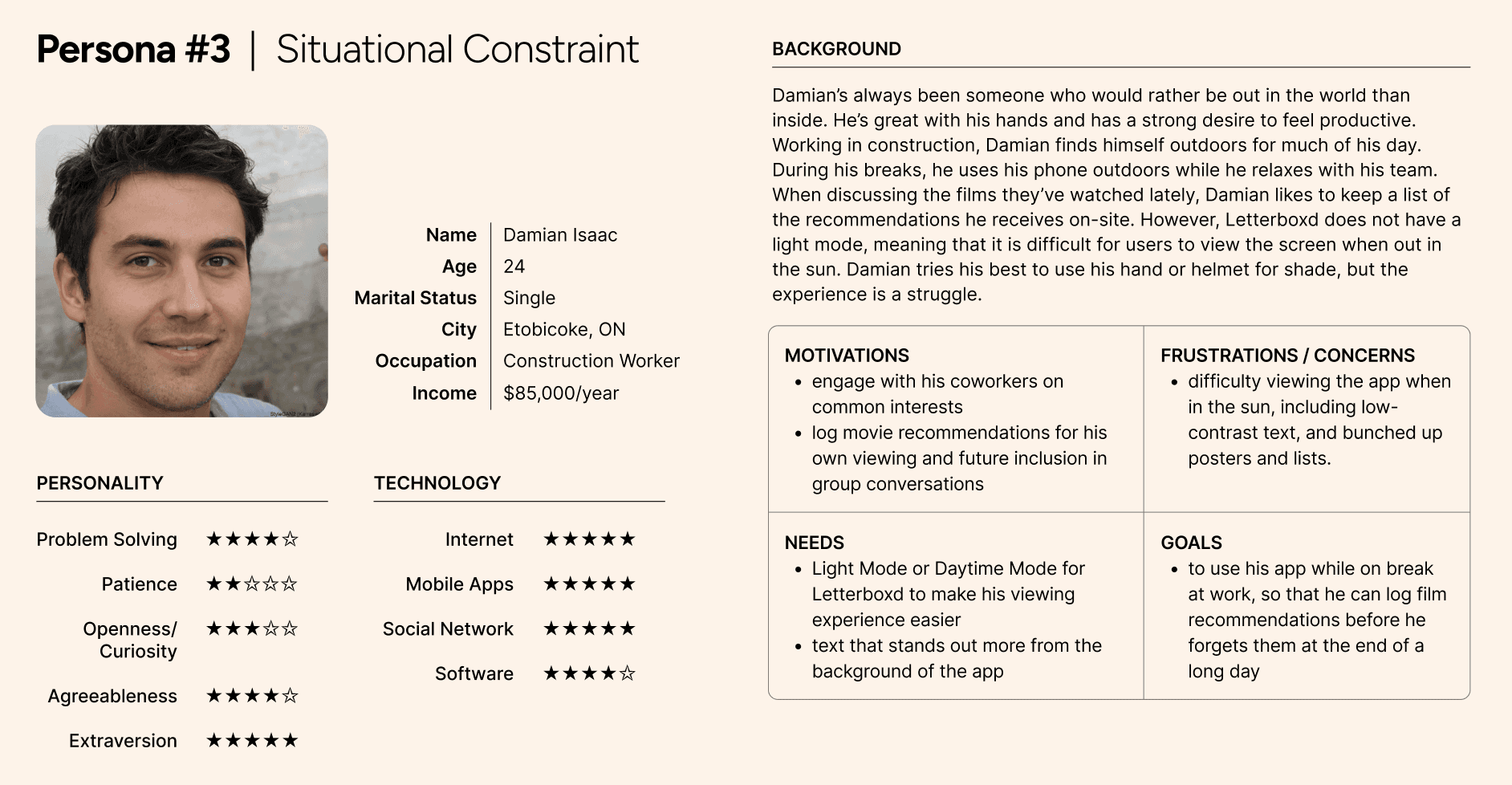
Identifying situational, temporary, and permanent visual constraints and developing 3 personas based on these constraints
Identifying situational, temporary, and permanent visual constraints and developing 3 personas based on these constraints
Identifying situational, temporary, and permanent visual constraints and developing 3 personas based on these constraints
Empathy Maps
Empathy Maps
Empathy Maps
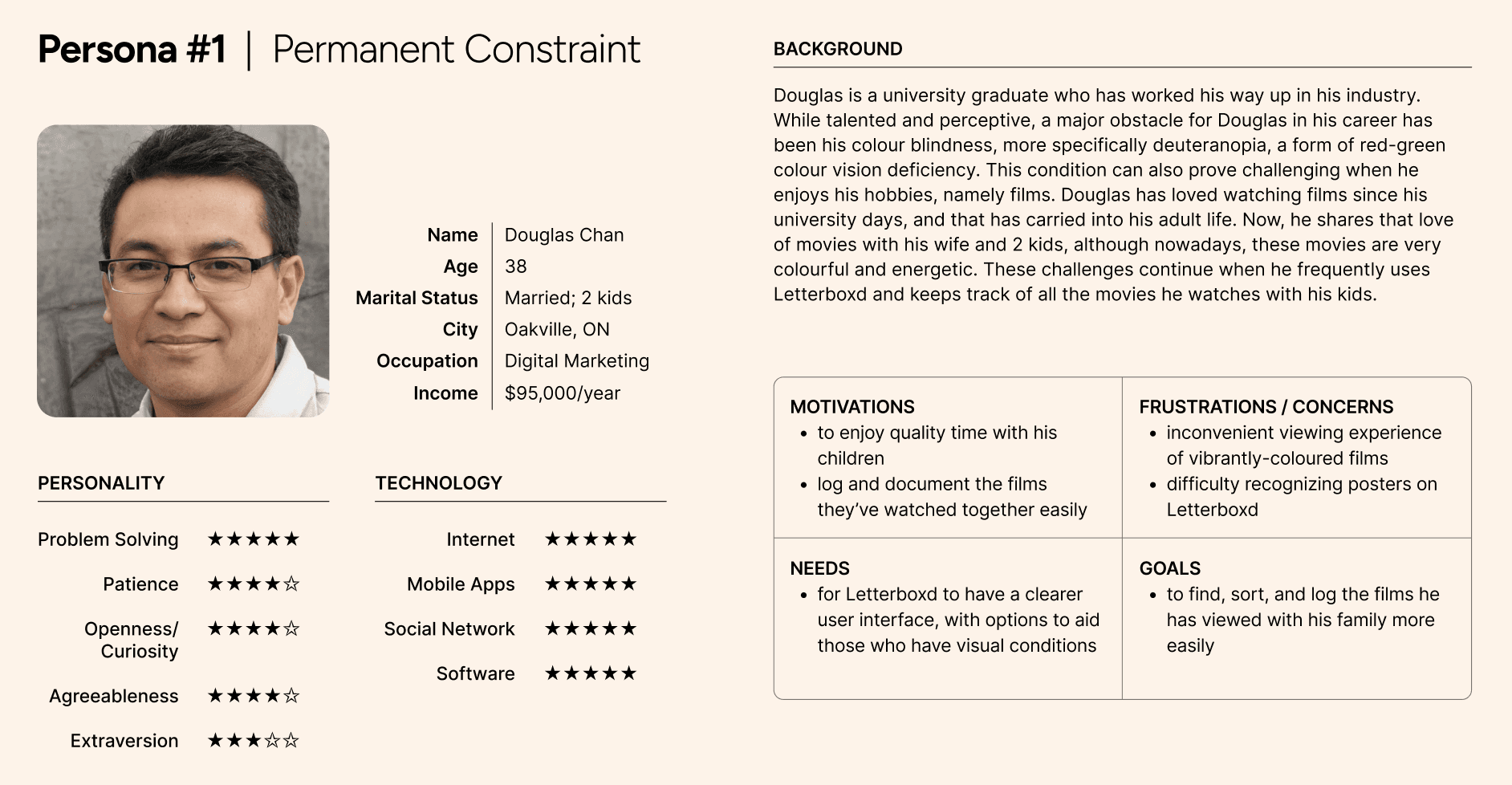
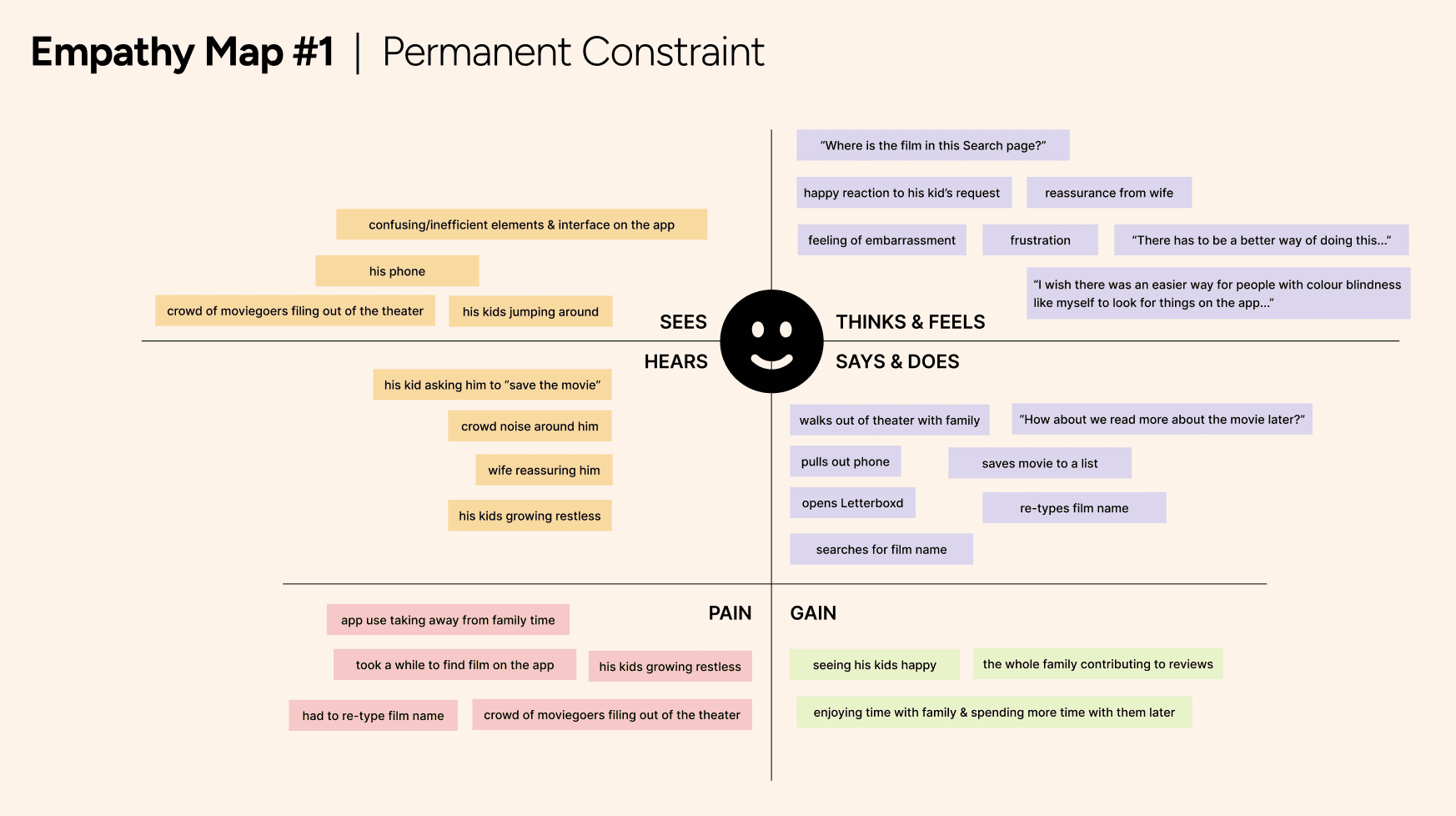
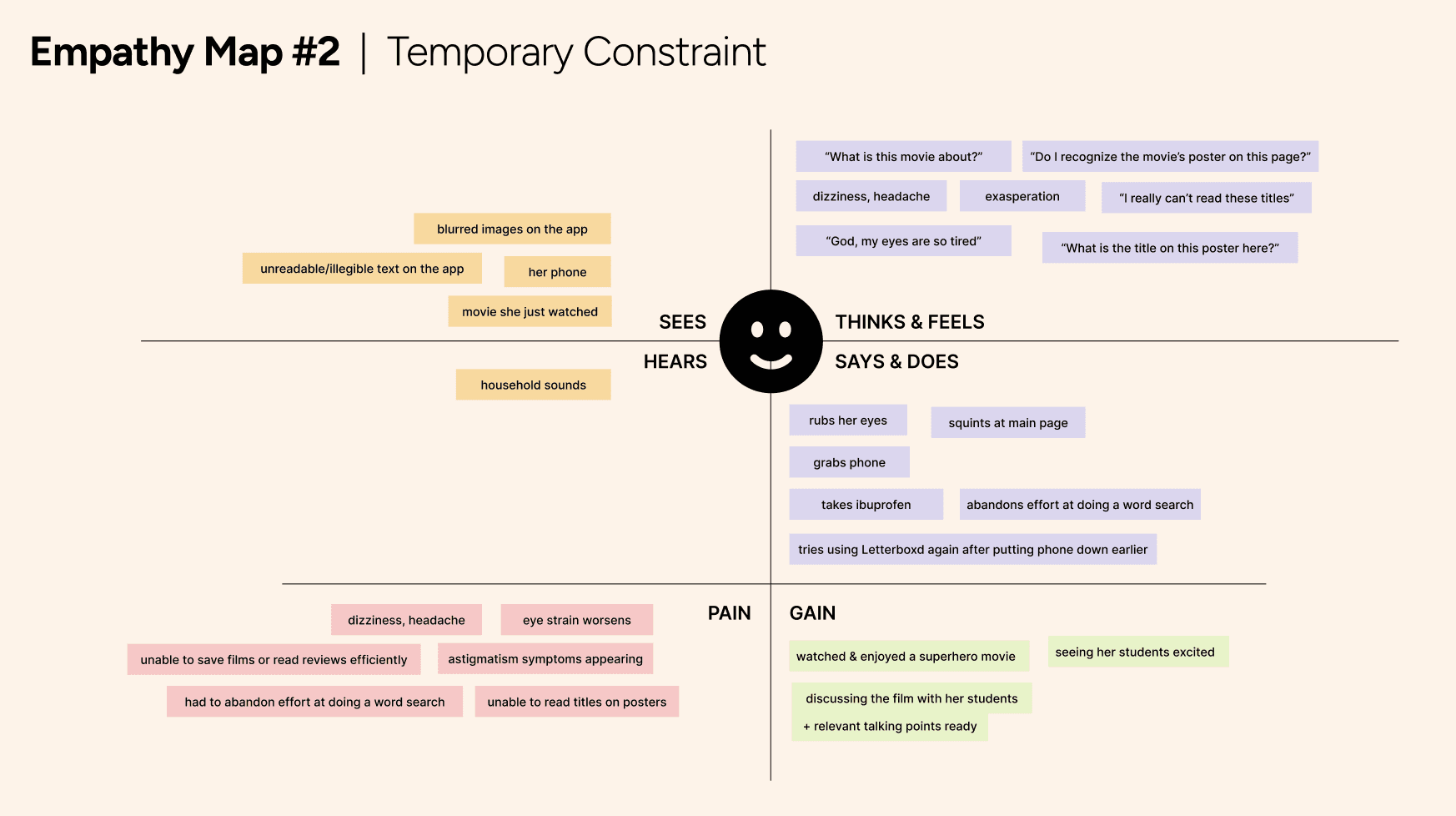
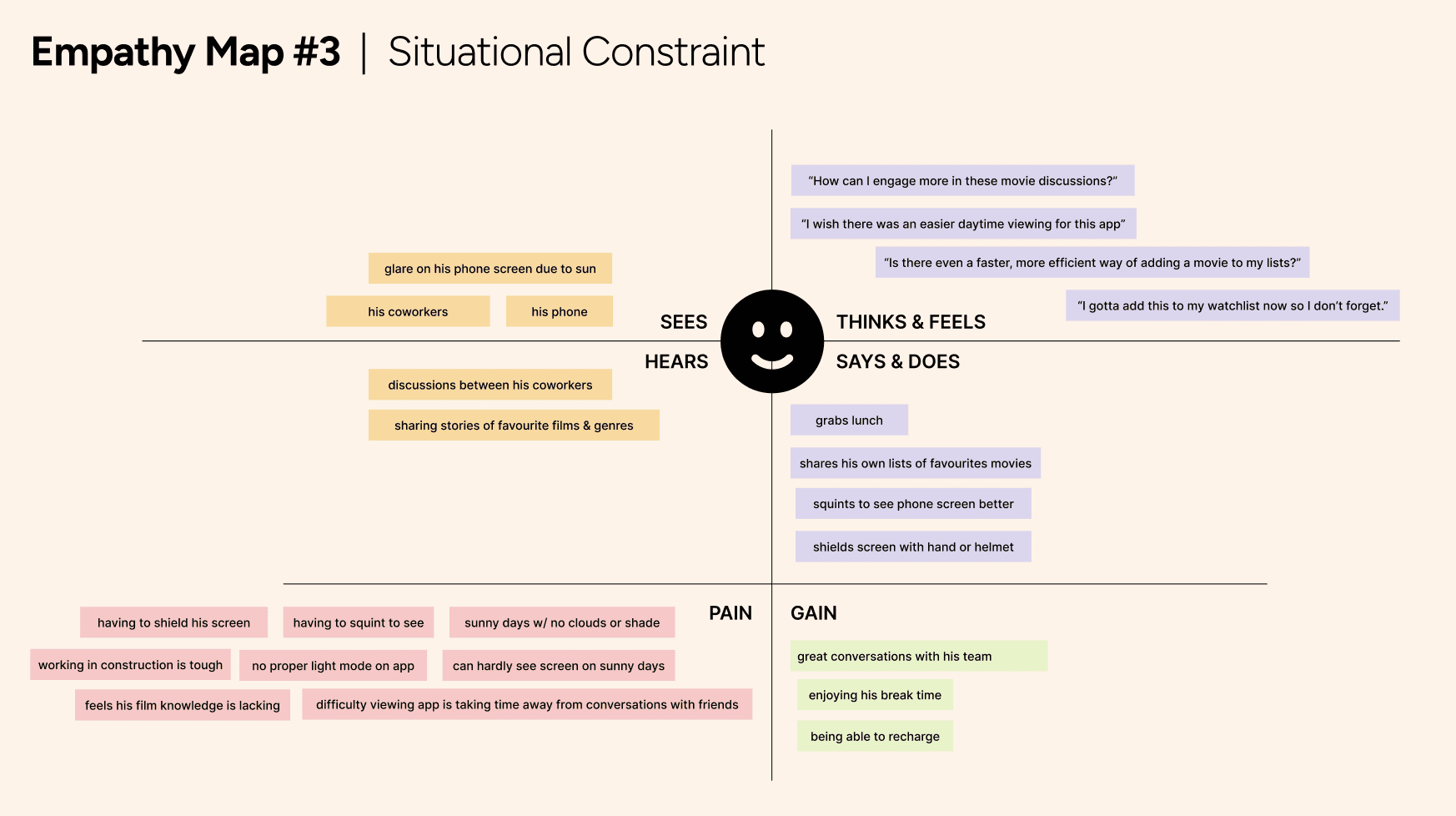
Developing empathy maps to further understand our personas and their needs
Developing empathy maps to further understand our personas and their needs
Developing empathy maps to further understand our personas and their needs
User Journey Map
User Journey Map
User Journey Map
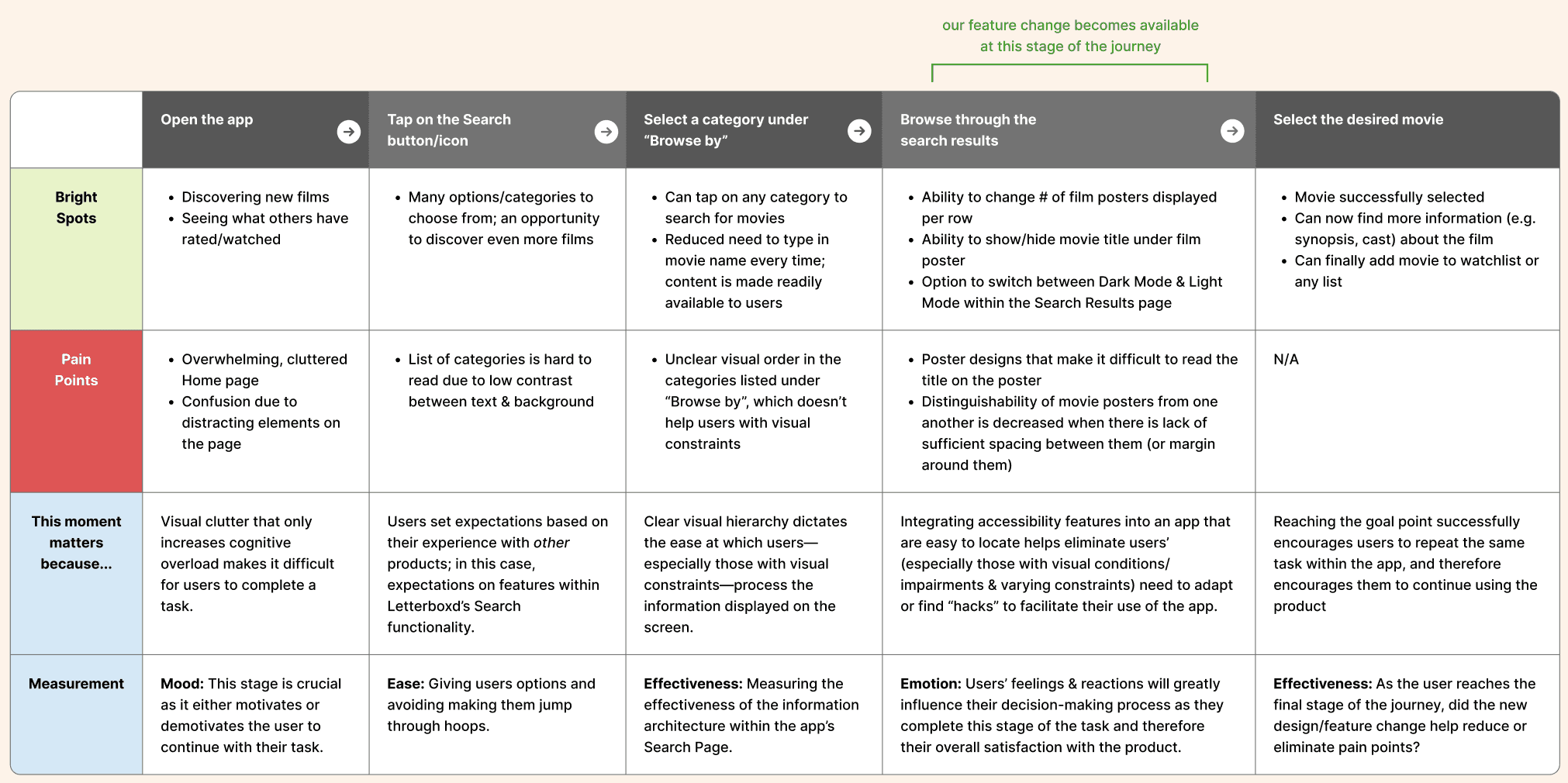
Mapping out the user's journey through our redesigned app
Mapping out the user's journey through our redesigned app
Mapping out the user's journey through our redesigned app
Paper Prototypes
Paper Prototypes
Paper Prototypes
User Testing
User Testing
User Testing
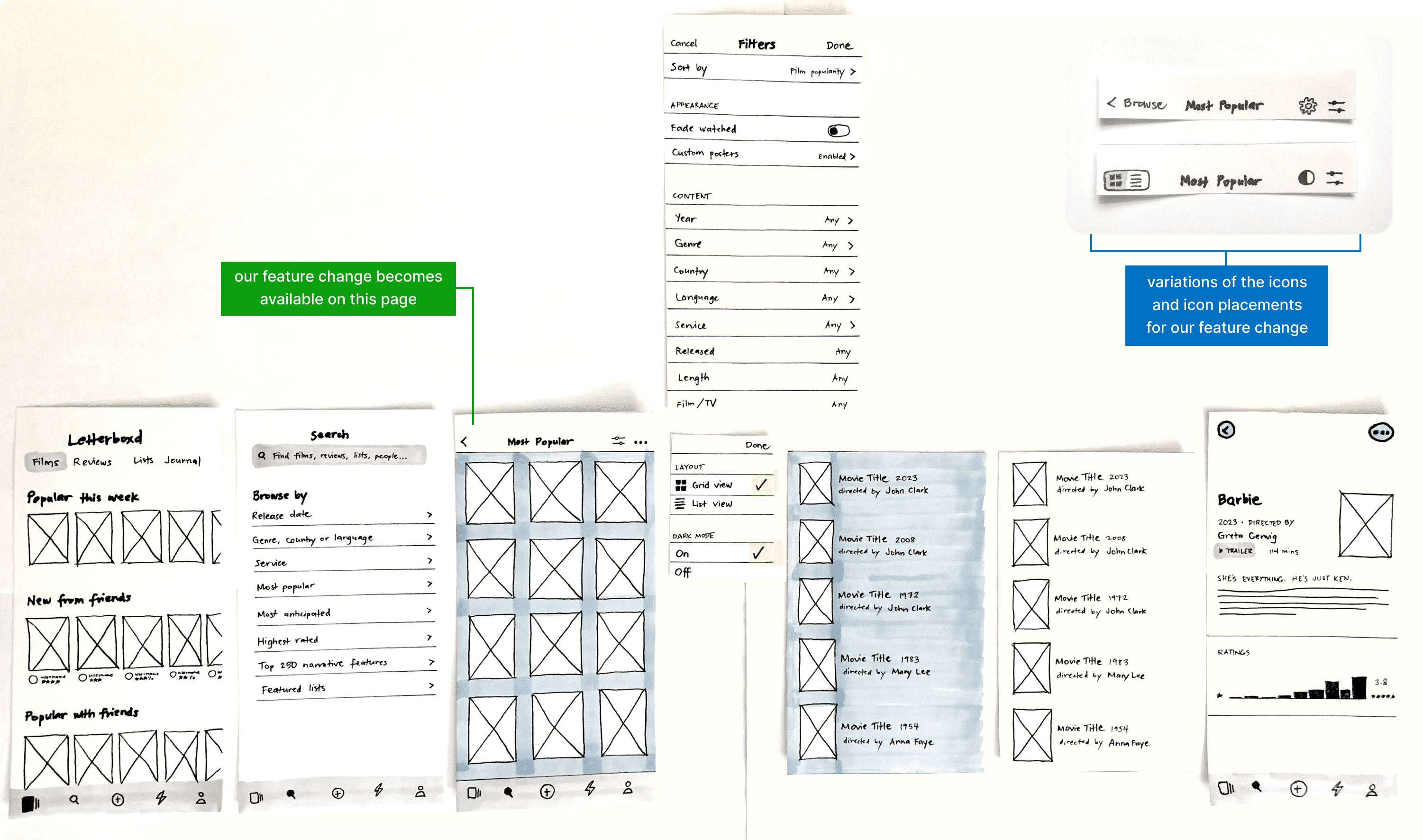
User testings were conducted with 5 participants using the paper prototypes I created. Notes on the participants' actions, behaviours, comments, expectations, and feedback were recorded as I observed their interaction with the paper prototypes.
Findings and insights:
Comments made by participants during the pre-task interviews reveal their enthusiasm to continue using Letterboxd, but that they find the app interface confusing and “crowded”. This led me to believe that the navigation and information flow within the app (pre-redesign) present complexities that hinder the participants from fully enjoying the product.
Observations made during the test sessions reveal that familiarity with certain elements dictates the participants’ expectation on what happens next as they interact with the app. This tells me that feelings of recognition and comfort while using the app greatly affect user satisfaction.
The improvement in the participants’ task completion time shows that the application of a simple feature change does help ease and improve the efficiency of completing tasks within the app.
Post-task interviews with participants show that while they experience varying levels of visual conditions and impairments, the ability to accomplish a task within the app without encountering any mistake is crucial. This tells me that error prevention is essential in accessible and inclusive design.
User testings were conducted with 5 participants using the paper prototypes I created. Notes on the participants' actions, behaviours, comments, expectations, and feedback were recorded as I observed their interaction with the paper prototypes.
Findings and insights:
Comments made by participants during the pre-task interviews reveal their enthusiasm to continue using Letterboxd, but that they find the app interface confusing and “crowded”. This led me to believe that the navigation and information flow within the app (pre-redesign) present complexities that hinder the participants from fully enjoying the product.
Observations made during the test sessions reveal that familiarity with certain elements dictates the participants’ expectation on what happens next as they interact with the app. This tells me that feelings of recognition and comfort while using the app greatly affect user satisfaction.
The improvement in the participants’ task completion time shows that the application of a simple feature change does help ease and improve the efficiency of completing tasks within the app.
Post-task interviews with participants show that while they experience varying levels of visual conditions and impairments, the ability to accomplish a task within the app without encountering any mistake is crucial. This tells me that error prevention is essential in accessible and inclusive design.
User testings were conducted with 5 participants using the paper prototypes I created. Notes on the participants' actions, behaviours, comments, expectations, and feedback were recorded as I observed their interaction with the paper prototypes.
Findings and insights:
Comments made by participants during the pre-task interviews reveal their enthusiasm to continue using Letterboxd, but that they find the app interface confusing and “crowded”. This led me to believe that the navigation and information flow within the app (pre-redesign) present complexities that hinder the participants from fully enjoying the product.
Observations made during the test sessions reveal that familiarity with certain elements dictates the participants’ expectation on what happens next as they interact with the app. This tells me that feelings of recognition and comfort while using the app greatly affect user satisfaction.
The improvement in the participants’ task completion time shows that the application of a simple feature change does help ease and improve the efficiency of completing tasks within the app.
Post-task interviews with participants show that while they experience varying levels of visual conditions and impairments, the ability to accomplish a task within the app without encountering any mistake is crucial. This tells me that error prevention is essential in accessible and inclusive design.
UI Style Guide
UI Style Guide
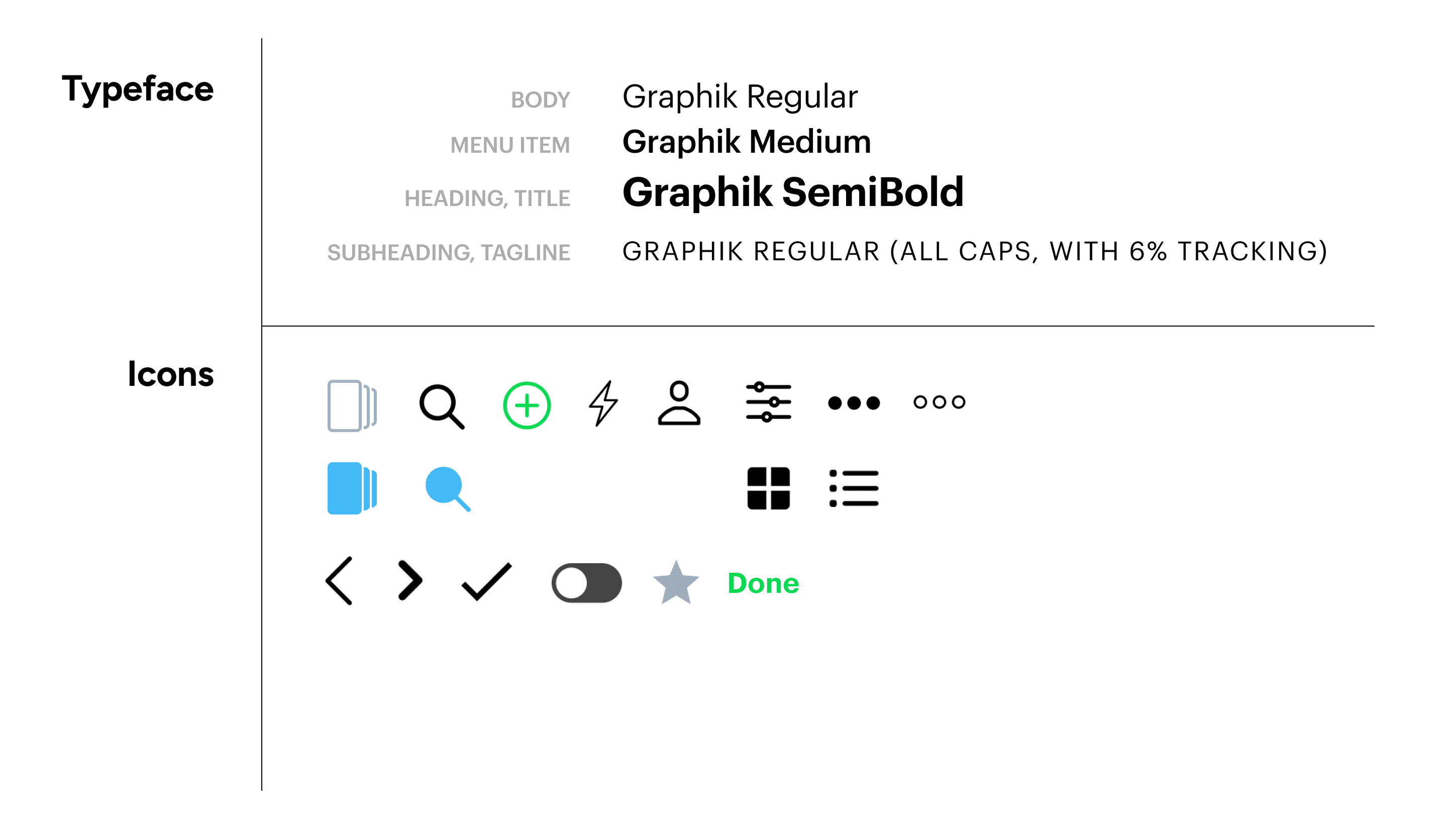
UI Style Guide
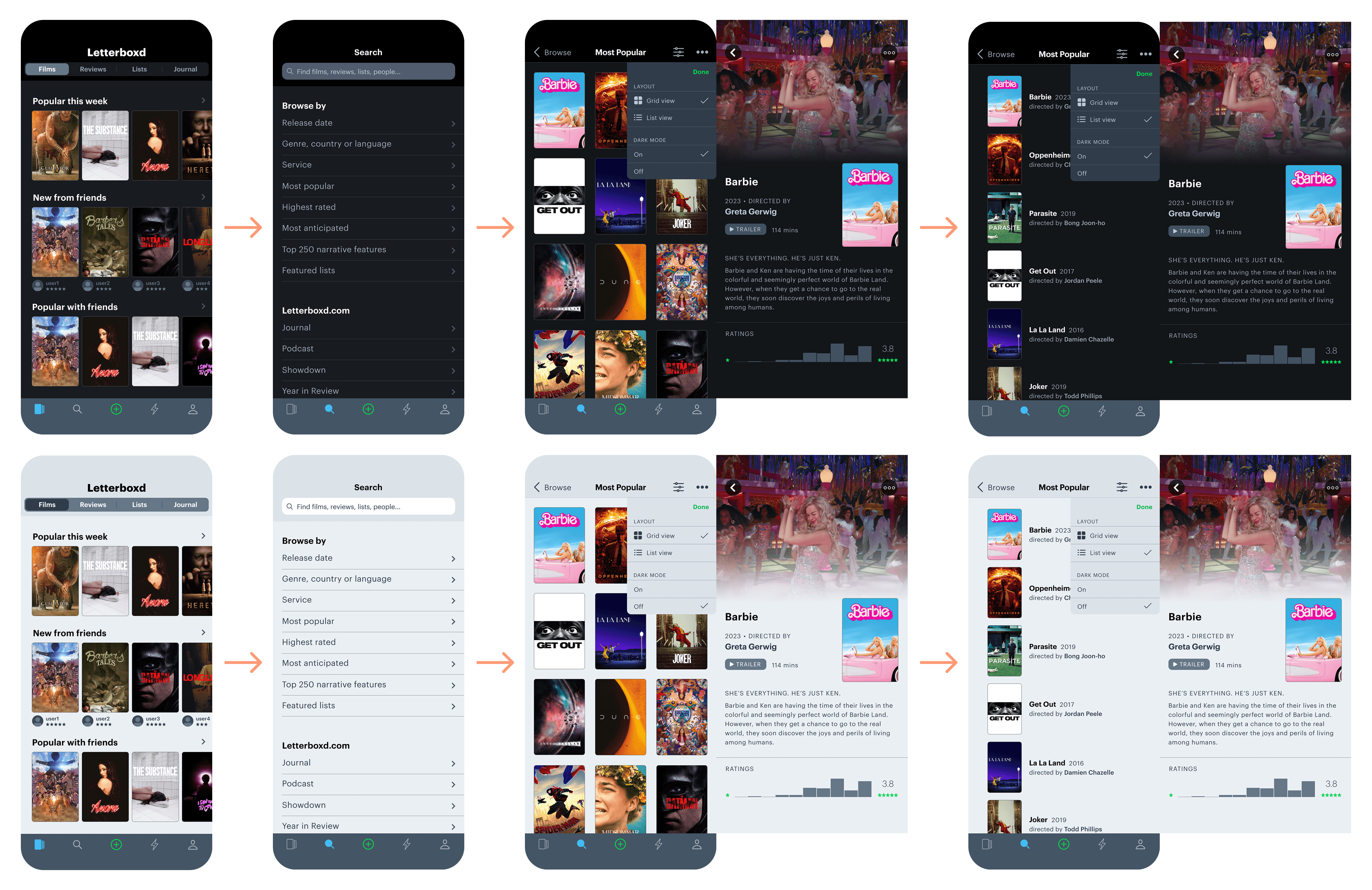
High-Fidelity Prototype
High-Fidelity Prototype
High-Fidelity Prototype
The ProtoPie prototype is accessible through this link.
The ProtoPie prototype is accessible through this link.
The ProtoPie prototype is accessible through this link.
Results
Results
Results
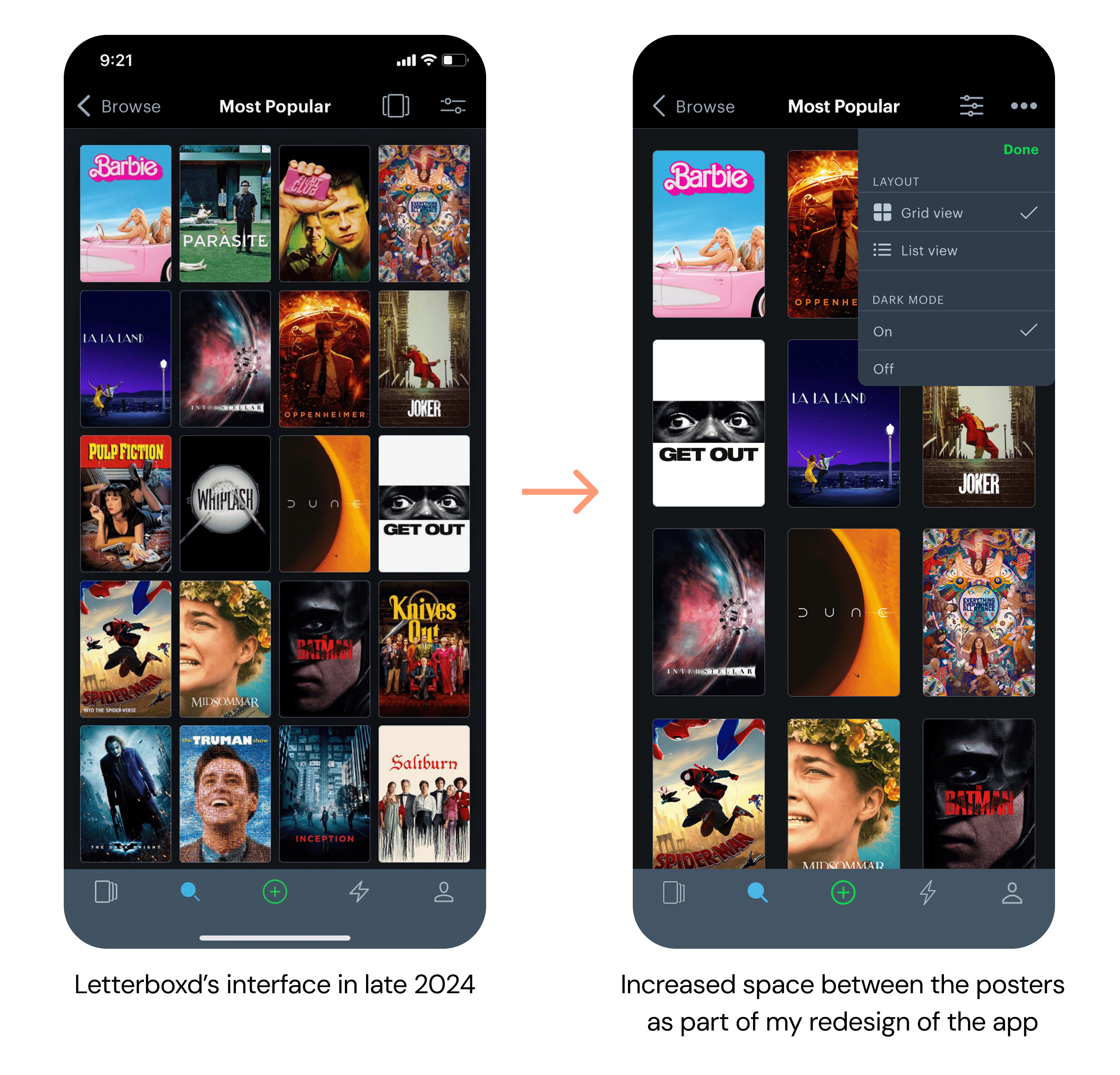
Redesign #1: Increased spacing between film posters
All 3 types of visual constraints can benefit from the improved distinguishability of elements and reduced visual clutter.
Redesign #2: Addition of a brand new menu
This addition will give users easy access to features that can help enhance visual comfort and experience for those with visual conditions/impairments.
Here we give the user options: depending on how the user feels as they go through their journey within the app, they have the option to choose what works best for them at the moment.
Redesign #1: Increased spacing between film posters
All 3 types of visual constraints can benefit from the improved distinguishability of elements and reduced visual clutter.
Redesign #2: Addition of a brand new menu
This addition will give users easy access to features that can help enhance visual comfort and experience for those with visual conditions/impairments.
Here we give the user options: depending on how the user feels as they go through their journey within the app, they have the option to choose what works best for them at the moment.
Redesign #1: Increased spacing between film posters
All 3 types of visual constraints can benefit from the improved distinguishability of elements and reduced visual clutter.
Redesign #2: Addition of a brand new menu
This addition will give users easy access to features that can help enhance visual comfort and experience for those with visual conditions/impairments.
Here we give the user options: depending on how the user feels as they go through their journey within the app, they have the option to choose what works best for them at the moment.
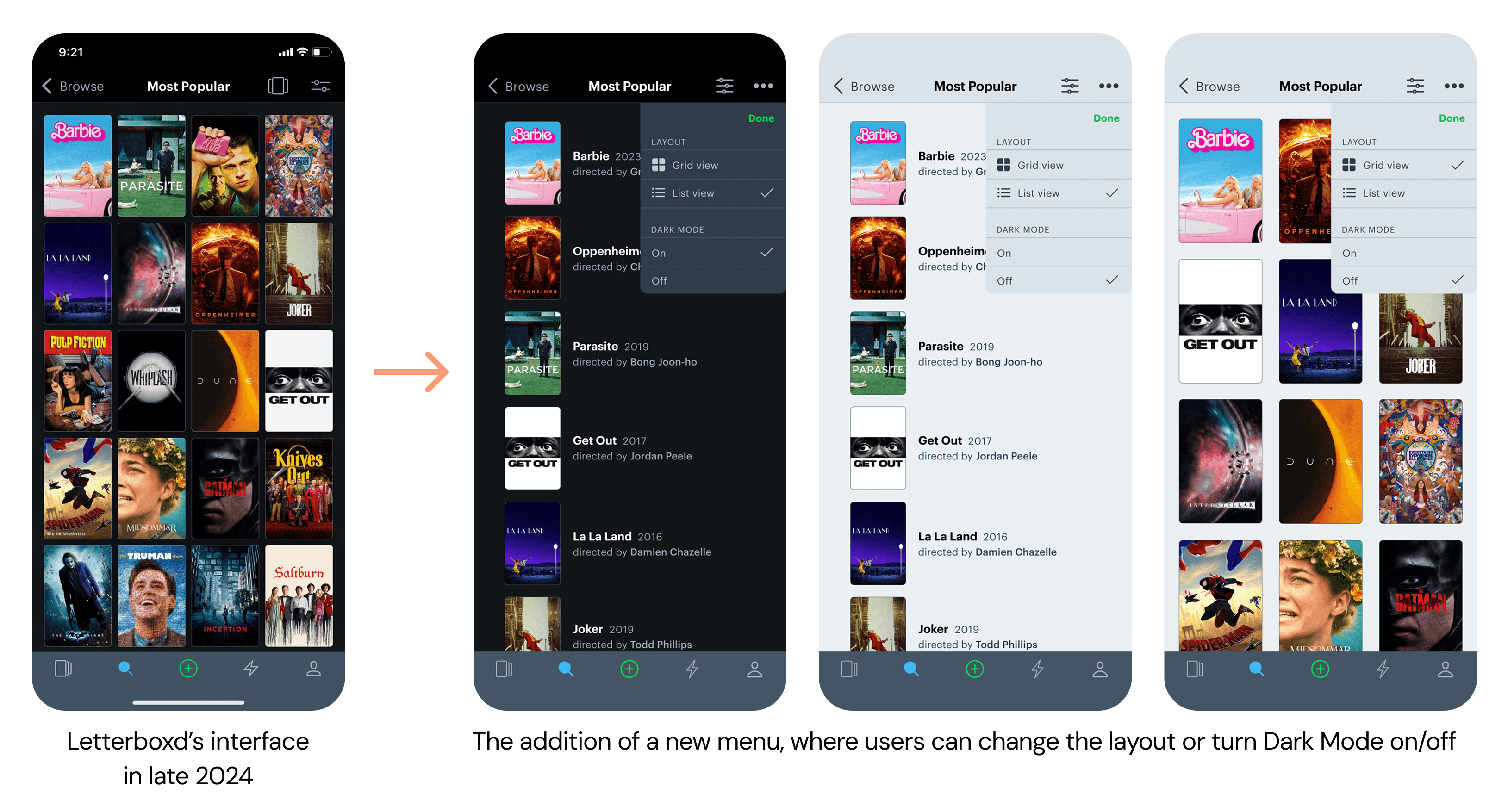
Redesign #3: The option to switch between Grid View + List View, and Dark Mode + Light Mode
Improving readability within the app
For example, List View can help make it easier to read each movie title without experiencing eye strain.
Light Mode can also be beneficial for situational constraints such as glare on phone screen from bright lighting conditions.
Redesign #3: The option to switch between Grid View + List View, and Dark Mode + Light Mode
Improving readability within the app
For example, List View can help make it easier to read each movie title without experiencing eye strain.
Light Mode can also be beneficial for situational constraints such as glare on phone screen from bright lighting conditions.
Redesign #3: The option to switch between Grid View + List View, and Dark Mode + Light Mode
Improving readability within the app
For example, List View can help make it easier to read each movie title without experiencing eye strain.
Light Mode can also be beneficial for situational constraints such as glare on phone screen from bright lighting conditions.
Trying to meet individual user needs is not easy. However, we can find opportunities to let users make their own choices while interacting with a product. Acccessibility and inclusive design go hand-in-hand with user autonomy. Letterboxd's interface (as of late 2024) forces users to complete tasks in narrowly-defined ways. By giving them the ability to customize the look of the Search Results page, not only do we make the app feel more accessible and inclusive: we also give users the freedom to choose what works best for them.
Trying to meet individual user needs is not easy. However, we can find opportunities to let users make their own choices while interacting with a product. Acccessibility and inclusive design go hand-in-hand with user autonomy. Letterboxd's interface (as of late 2024) forces users to complete tasks in narrowly-defined ways. By giving them the ability to customize the look of the Search Results page, not only do we make the app feel more accessible and inclusive: we also give users the freedom to choose what works best for them.
Trying to meet individual user needs is not easy. However, we can find opportunities to let users make their own choices while interacting with a product. Acccessibility and inclusive design go hand-in-hand with user autonomy. Letterboxd's interface (as of late 2024) forces users to complete tasks in narrowly-defined ways. By giving them the ability to customize the look of the Search Results page, not only do we make the app feel more accessible and inclusive: we also give users the freedom to choose what works best for them.